
Creating Membership Tiers & Gating Chapters
Last updated: 2026-04-08
On This Page
Content gating is how you turn free readers into paying subscribers. You create membership tiers (subscription plans), then assign specific chapters to those tiers. Readers who want access to gated chapters must subscribe to the appropriate tier.
This guide covers the full process: creating tiers, pricing strategies, and gating your chapters.
How Content Gating Works
The flow is straightforward:
- You create membership tiers — Each tier has a name, description, and monthly price
- You mark chapters as gated — In the chapter editor, select which tier(s) can access each chapter
- Readers subscribe — When a reader subscribes to a tier, they automatically get access to all chapters assigned to that tier
- Access is enforced — Gated chapters show a subscription prompt to non-subscribers, while subscribers read freely
Best practice: Keep your first 3-5 chapters free. This gives readers enough to get hooked on your story before asking them to pay.
Step 1: Create Your Membership Tiers
Navigate to your Author Dashboard and click the Membership Plans tab.
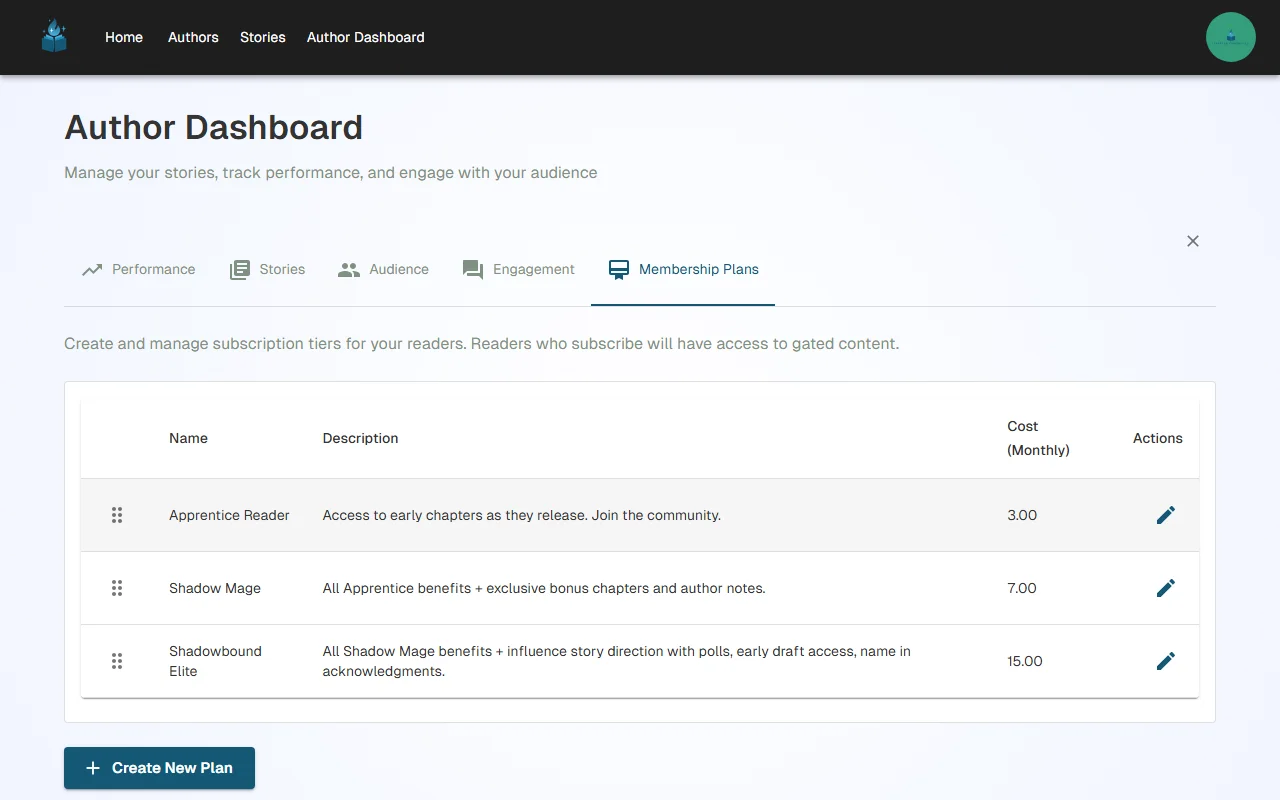
Creating a New Tier
Click "Add New Plan" to open the tier creation form:
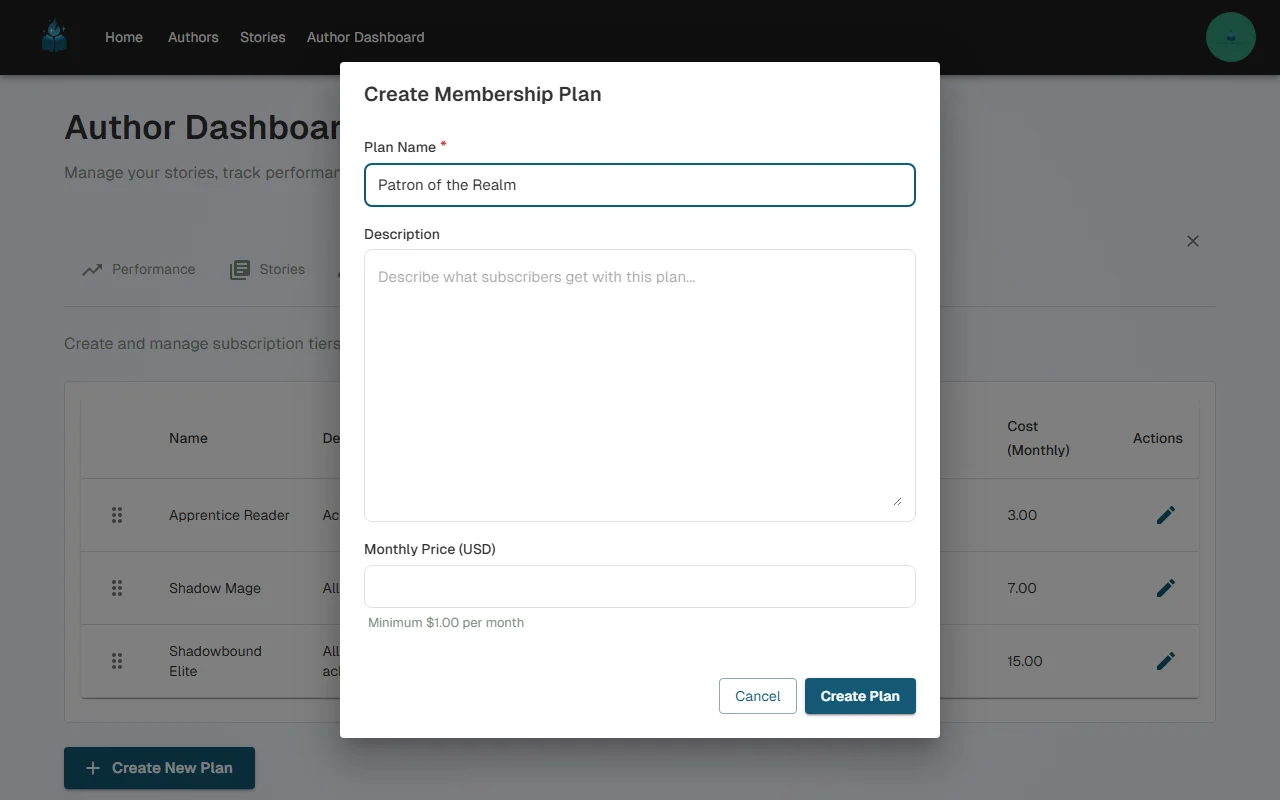
Fill in the details:
- Name — Choose something thematic that fits your story's world (e.g., "Apprentice Reader," "Shadow Mage," "Shadowbound Elite")
- Description — Explain what subscribers get at this level
- Monthly Price — Set your price in your local currency (we recommend the equivalent of $3-$15 USD for most fiction, e.g., MX$60-MX$300 for Mexican authors)
Click Save to create the tier. You can create as many tiers as you want.
Recommended Tier Strategy
Most successful authors use 2-3 tiers. Prices below are in USD — if you're in another country, your tiers will be in your local currency:
| Tier | Price Range (USD equivalent) | What to Include |
|---|---|---|
| Basic | $3-5/month | Standard chapter access as they release |
| Premium | $7-10/month | Everything in Basic + bonus chapters, author notes, behind-the-scenes content |
| VIP | $15+/month | Everything in Premium + community perks, influence story direction with polls, early draft access |
Tips for pricing:
- Look at what authors in your genre charge on Patreon for reference (adjust for your local currency)
- Start with 2 tiers and add more later based on reader demand
- Your cheapest tier should feel like a no-brainer for engaged readers
Step 2: Gate Your Chapters
Once you have at least one membership tier, you can gate individual chapters.
Open the Chapter Editor
- Go to your Author Dashboard > Stories tab
- Click on the story you want to gate
- Click on the chapter you want to edit
- Navigate to the Settings tab
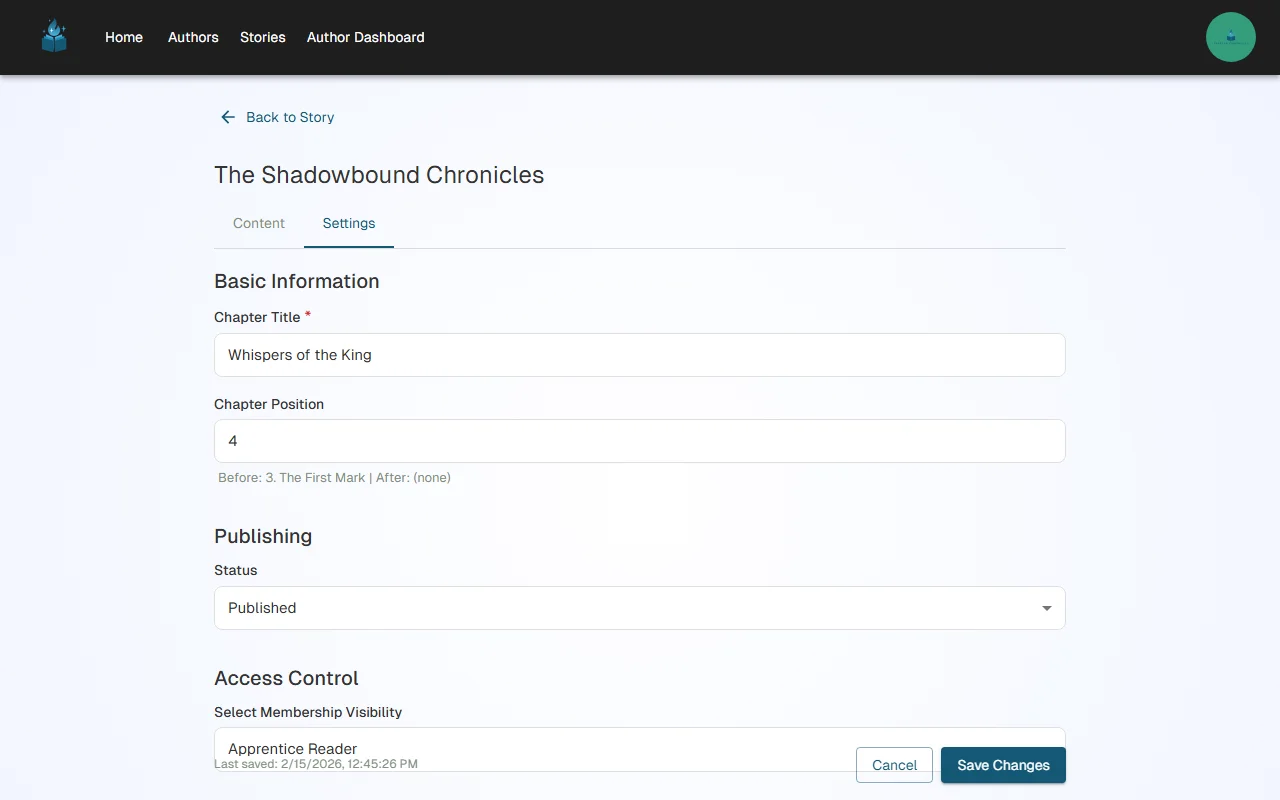
Select Membership Visibility
In the Settings tab, you'll find the Membership Visibility section:
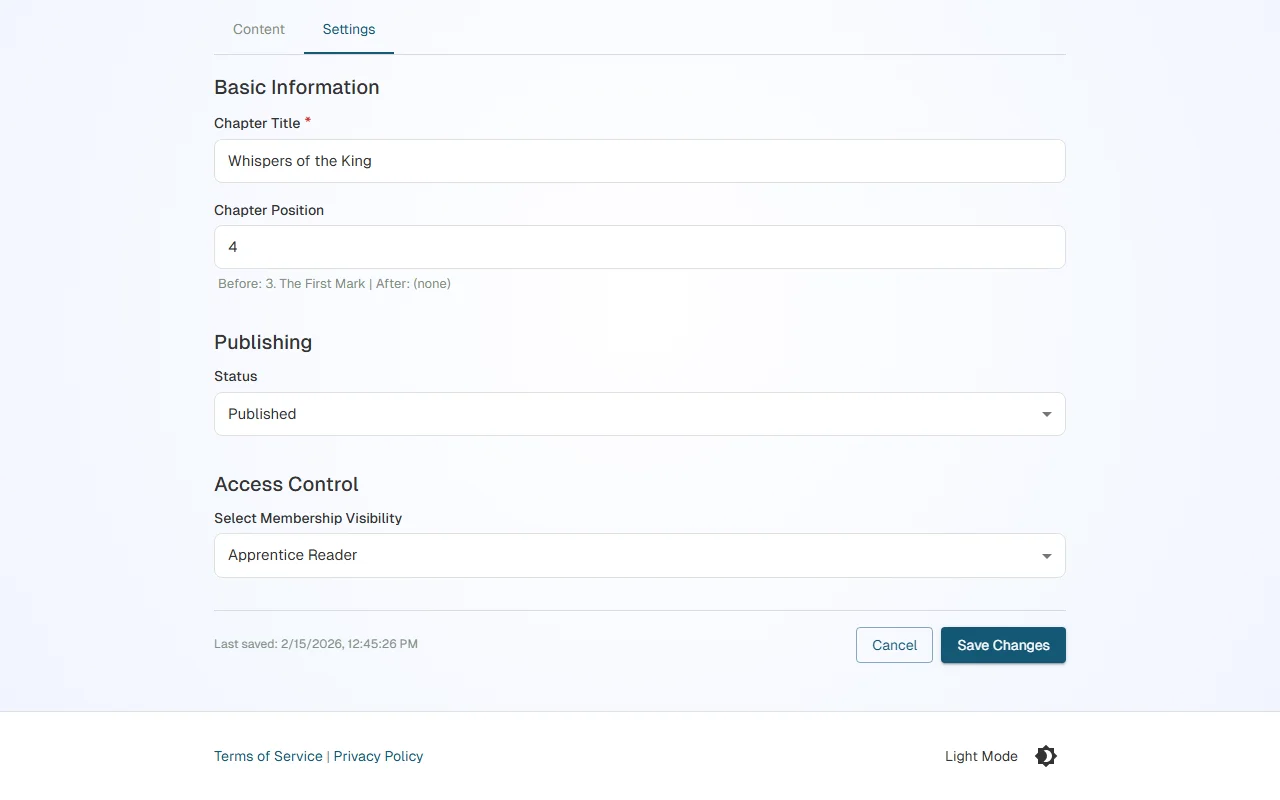
You have two options:
- Public — The chapter is free for everyone to read (no account required)
- Select specific tiers — Only subscribers of the selected tier(s) can read the chapter
When you select a tier, readers who are not subscribed will see a prompt to subscribe instead of the chapter content.
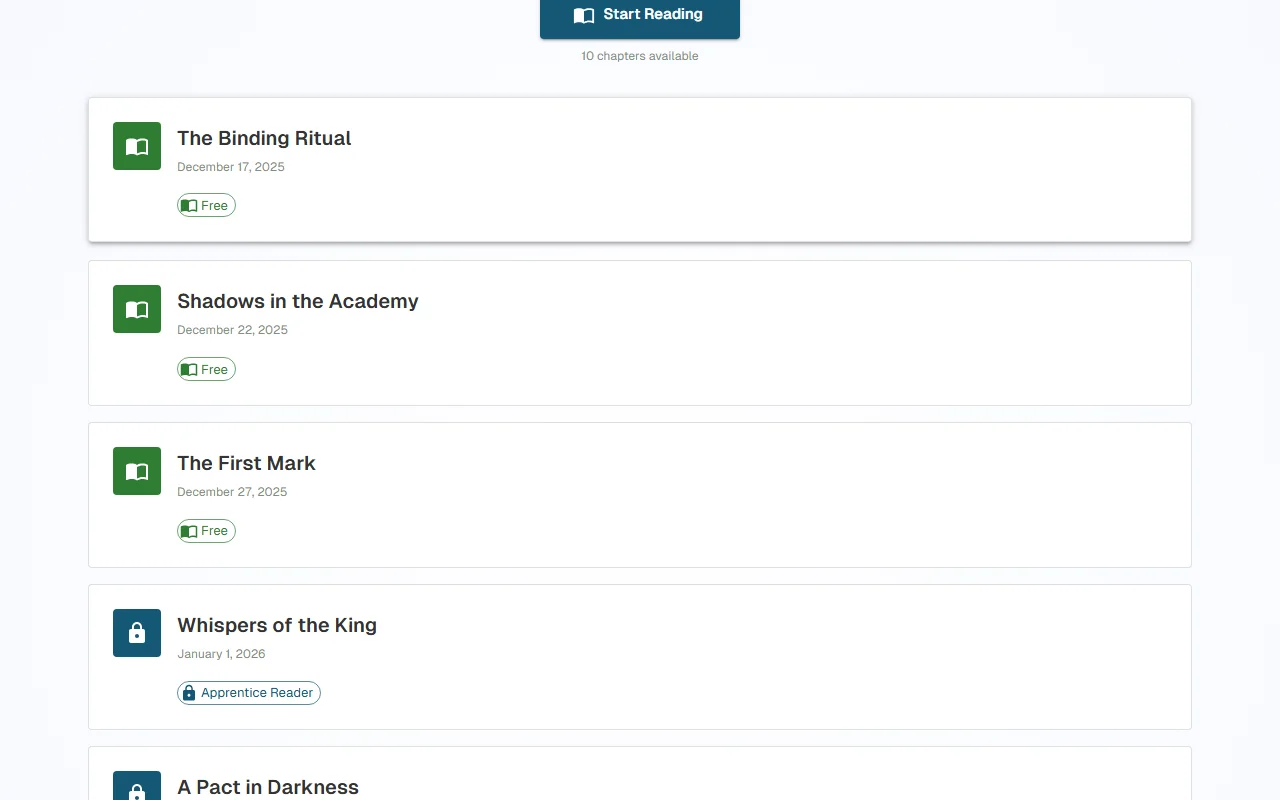
Chapter List View
After gating some chapters, your story's chapter list will show which chapters are public and which are gated:
Recommended Gating Strategies
The Free Preview Strategy (Most Popular)
Keep the first 3-5 chapters free, then gate the rest:
| Chapters | Access |
|---|---|
| 1-3 | Public (free) |
| 4+ | Gated (requires subscription) |
Why it works: Readers get hooked on your story and characters. By chapter 3-5, they're invested enough to pay for more.
The Tiered Access Strategy
Gate chapters by tier level for different content:
| Content | Access |
|---|---|
| Main story chapters | Basic tier ($3/mo) |
| Bonus/side story chapters | Premium tier ($7/mo) |
| Early drafts + author commentary | VIP tier ($15/mo) |
Why it works: Gives readers options at different price points and rewards your biggest fans with exclusive content.
The Rolling Free Strategy
Keep the most recent chapters gated, but make older chapters free over time:
| Chapters | Access |
|---|---|
| Published 30+ days ago | Public (free) |
| Published in last 30 days | Gated (requires subscription) |
Why it works: Builds a larger free reader base while rewarding subscribers with early access.
Best Practices
- Be consistent — If you gate chapters starting at chapter 4, gate all subsequent chapters the same way
- Higher tiers should include lower-tier content — If Basic gets chapters 4+, Premium should get those plus bonus content
- Tell readers what's coming — Mention in your free chapters that premium content continues the story
- Publish regularly — Subscribers expect ongoing value. Aim for at least 1-2 new chapters per week
- Use your newsfeed — Post updates when new chapters are available to keep subscribers engaged
Automatic Tier Cascade
If you use the "Rolling Free" strategy above — or any model where chapter access changes as you publish — you can automate this entirely with tier cascade rules. Instead of manually updating each chapter's access, you configure rules at the story level that automatically shift chapters between tiers every time you publish a new chapter.
Each tier gets a "Chapters Behind Latest" value. Your most expensive tier gets the newest chapters, and as you publish more, older chapters cascade down to cheaper tiers. Access is cumulative: higher-priced tiers can read everything cheaper tiers can read, plus newer content.
You can optionally add a "Goes public" rule so that chapters eventually become free for everyone once they're far enough behind the latest. This is called the "goes public" terminal state, and it's permanent once triggered.
Cascade rules apply to all published chapters by default, and you can opt individual chapters out if they should stay gated permanently (e.g., bonus content or premium-exclusive material).
For the full setup guide, including batch scheduling, release queue management, and buffer health monitoring, see Scheduling Chapters & Managing Your Release Queue.
What's Next?
- Haven't set up billing yet? Set up Stripe Connect to receive payments
- Ready to track your growth? Understand your analytics
Have questions about tiers or gating? Reach out to us at support@chapterchronicles.com — we're here to help you succeed.
Ready to Start Publishing?
Join authors building their creative business on Chapter Chronicles. Free to start, simple pricing when you earn.
Sign Up Free